| MAGIC VOICE | Inbetriebnahme - Start up |
![]() |
Allgemeines General |
Einführung Introduction |
Anschluss Connection |
Anwenden des Moduls Using the Module |
Vokabular Vocabulary |
Tips & Tricks Tips & Tricks |
| Ergänzendes Additional stuff |
Demos Demos |
Spiele Games |
Zeitschriften Magazines |
Sprach Downloads Speech Downloads |
Lexikon Lexicon |
|
| Internes Internal |
Hardware Hardware |
Firmware Firmware |
Sprachdaten Speechdata |
Bit-Format Bit allocation |
De-/Codierung De-/Coding |
|
| Nützliches und mehr Utilities and more |
Speech Playtool | Magic Game Cart | Magic Talkie | Magic Voice NT | Ersatzteile & Reparatur Spares & Repair |
| Im Folgenden wird die Inbetriebnahme und der Anschluss des Magic Voice Moduls erklärt. | Below will be explained how to start up and connect the Magic Voice Module. |
| Allgemeines - General |
| Das Magic Voice Modul wird in den Modul-Steckplatz des C64 gesteckt. Für den Betrieb mit dem C128 muss beim Einschalten des Computers die Commodore-Taste gedrückt werden. | Plug the magic voice into the cartridge port of the C64. To cooperate with the C128, hold down the Commodore-key as you turn on the computer. |
| Audioverbindung - Audio connection |
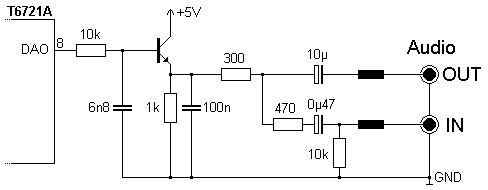
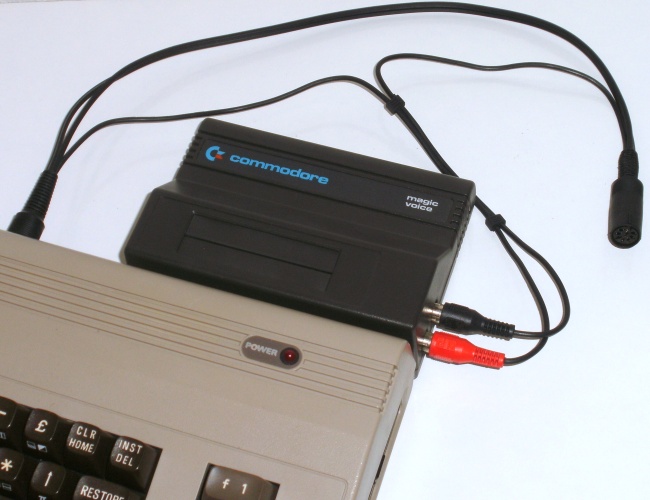
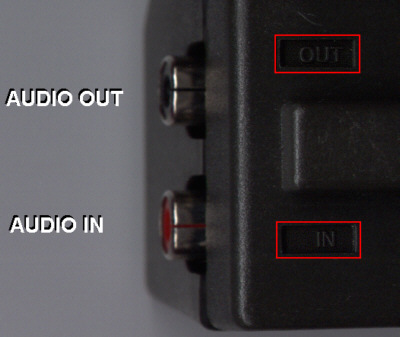
| Das Audiosignal des Magic Voice und des SID kann man im Modul oder im C64 zusammenführen. Hier eine kurze Erklärung des interne Aufbaus. Das Modul hat seitlich zwei Cinch-Buchsen. Auf der Unterseite sind diese mit IN (rote Buchse) und OUT (schwarze Buchse) bezeichnet. | The audiosignal of the Magic Voice and the SID can be mixed either in the module or in the C64. Here a short explanation of the internal layout. At the side of the Module there are two audio sockets. At the bottom they are marked with IN (red socket) and OUT (black socket). |
![]() |
![]() |
| Magic Voice Audio | Schaltbild - Circuit Diagram |
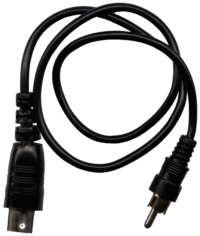
| Zum Lieferumfang des Moduls gehört ein Audiokabel. | The audio cable that comes packet with the speech module. |
![]() |
![]() |
| Wird das beiliegende Audiokabel verwendet, ist der Ausgang (OUT) des Moduls mit dem Audioeingang des C64 verbunden. Die Audio/Video Buchse ist belegt. Der Ton wird zusammen mit dem Bild am Antennenausgang ausgegeben. Die Bild- und Tonqualität sind dabei aber eher unbefriedigend. | If using the audio cable, the output (OUT) of the module is connectet with the audio input of the C64. The audio/video socket is occupied. The sound together with the picture is available at the RF-Jack. Thereby the quality of the image and sound are rather unsatisfying. |
| Magic Voice Audio-OUT to C64 Audio-IN |
![]() |
Audio and Video Signal to Television |
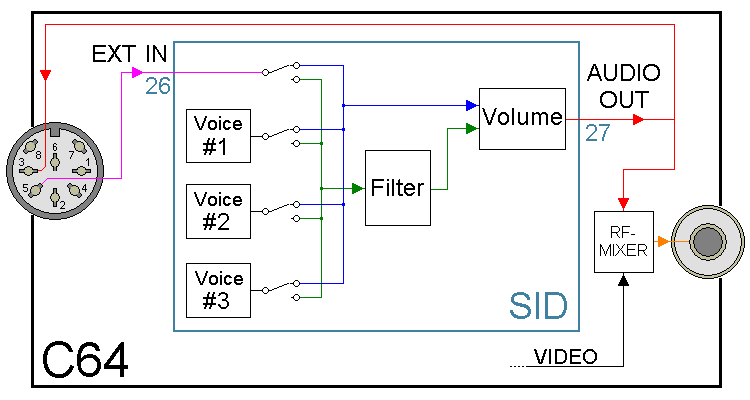
| C64 Intern | (SID = Sound Interface Device) |
Variante 1: Audio Mix im SID Verbindet man das Audio-OUT Signal des Moduls mit dem Audio-IN Eingang des C64, so wird das Sprachsignal durch den SID-Chip geführt. Aus diesem Grund wird durch die Initialisierungs-Routine des Magic Voice Moduls die Lautstärke des SID auf das Maximum eingestellt. Mit dieser Konfiguration ist es möglich, das Audiosignal des Magic Voice durch den Filter des SID zu beeinflussen. Wer den Voice Messenger Speech 64 von Currah besitzt, hat hierfür bereits ein passendes Kabel, denn das dort mitgelieferte Kabel erlaubt genau diese Möglichkeit. |
Option 1: Audio mix in the SID By connecting the audio signal OUT of the module to the audio input IN of the C64, the speech signal is passed through the SID-chip. For this reason, the initialization routine of the Magic Voice module sets the volume of the SID to the maximum. With this configuration it is possible to affect the audio signal of the Magic Voice through the filter of the SID. If you own a Voice Messenger Speech 64 cartridge from Currah, then you have already a suitable cable, because the cable supplied with it allows such a possibility. |

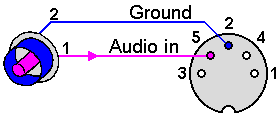
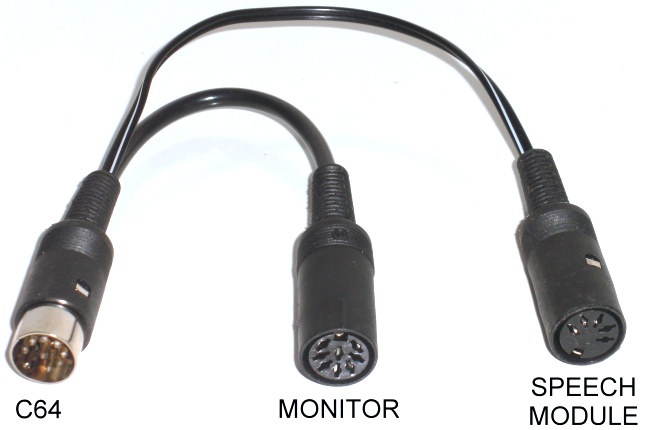
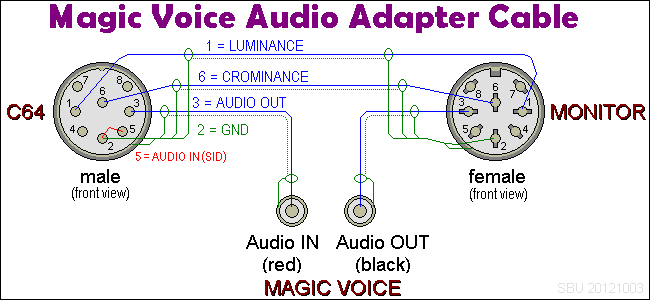
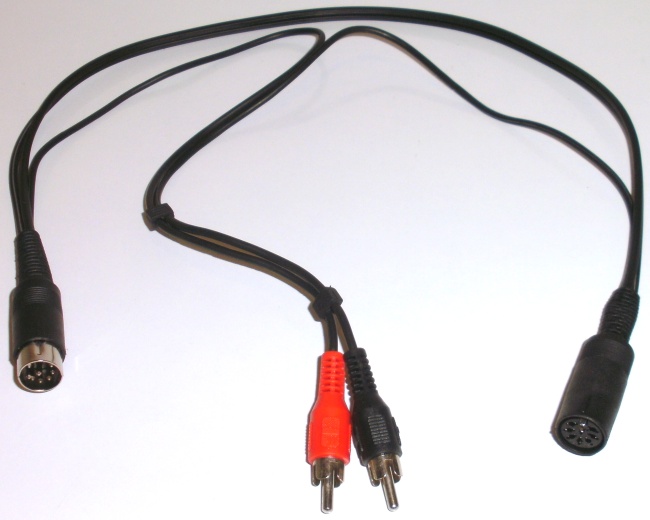
Variante 2: Audio Mix im Magic Voice (empfohlen) Das Bildsignal wird wie gewohnt zum Monitor verbunden. Das C64-Audiosignal des Monitorkabels wird mit dem Audio-IN Eingang des Magic Voice Moduls verbunden. Der Ausgang OUT des Moduls wird dann direkt mit dem Monitor oder der Stereoanlage verbunden. Damit ergibt sich ein ausgewogenes Lautstärkeverhältnis zwischen dem SID Ton und der Sprache. Es empfiehlt sich ein Adapterkabel wie unten abgebildet. Zusätzlich ist der Audio-In Eingang des C64 mit Masse verbunden, dadurch werden Störgeräusche reduziert. |
Option 2: Audio mix in the Magic Voice (recommended) The video signal is connected to the monitor as usual. The C64-audio signal of the monitor cable is connected to the audio input IN of the Magic Voice module. The output OUT of the module is then connected directly to the monitor or the stereo system. This results in a balanced volume between the SID sound and speech. An adapter cable as shown below is recommended. In addition, the audio input of the C64 is connected to ground, this leads to noise reduction. |


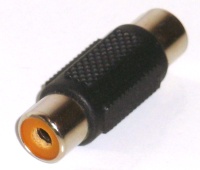
| Wenn man das Magic Voice nicht benutzt, verbindet man einfach die beiden Cinch-Stecker mit einem im Handel erhältlichen Verbindungsstück. | If you do not use the Magic Voice, you simply connect the two RCA plugs with a commercially available connector. |

| Hinweis - Note |